How to translate KLMS into a new language with menu and system

1. The translations to be made are not in Word or text files. They are systematically made in a structure that makes them easy to import into the code. But don't worry. This is easy to learn within 5 min with this FAQ page.

2. You will use a tool that is free on the Internet and most easy to download to translate is from www.poedit.com
3. In this software from the Po Edit app you will have a view that looks like this.

Turning KLMS into another language makes it possible to switch menus to this language under Settings in KLMS: (see the article when we introduced Spanish as the fourth language)
For the translator: (who has a deal with Klick Data or are to give a quote)
4 Get the latest XLF - file from KL or Klick Data admin by mail or any other file transfer system. An XLF file is the format that will be used in the translation process. (You will not use Microsoft Word)
4b. Recieve zip-file :
4c. Unzip Save XLF file messages.xlf with syntax. like KLMS_messages_eng_to_bra_220223.xlf if bra= Brazilian, pol for polish, etc, and the correct date in the end before .xlf
5a. If you use Macintosh: For the translator: If Macintosh: Download Po Edit from https://poeditor.com/kb/xliff-editor
5b. If Windows: Use XLIFF and download from this link: https://download.poedit.net/Poedit-3.0.1-setup.exe . There is a FAQ on this process on https://poeditor.com/kb/xliff-editor

Open the file that ends with .xlf sent from Klick Data admin. The file will have a date with yymmdd so you see what is the latest sent from Klick data if there is a delay in the process of offer and start of translations with the latest system updates. Sometimes you need to translate parts of the system and not all rows. The syntax is important in file naming is vital for all involved so no confusion is set.
6. Do the translations in Po Edit software row by row
6a. Browse the translation file after you will download it from the attachment sent from Klikc Data admin or agent contact (Like example: KLMS.messages.nl-220228.xlf).
6b. You focus will mainly on only two columns Source & Target
6c. Source is the English source text.
6d. Target will contain your translation progress.
6e. Please check out the attached files for the source file and images for more descriptions
6f. Reply in conversations with questions so you communicate in the process for full understanding saving both parties efforts and time.

In XLIFF the translator focuses on the Target column and translates from the Source column. The identifier, Meaning, and Description are not in focus for any translations.
7, Save the file as KLMS_messages_eng_to_bra_VR_220224.xlf (see 4) as VR being a signature of the translator like "Vito Richardo", the translator, and 220224 the date you were finished (yymmdd)
8. Send the file to the contact you have at Klick Data or its agent.
9. Wait for the validation and feedback that all is correct
10. Get paid by the service used
Don't forget that translations are needed on a regular basis since we develop the system and enhance the system. It's over 2000 lines, and it normally takes more than 8 hours (a full day) to translate this file. Depending on the experience.
To understand the concept and explain into the context of what all items and menu means and get the User experience to the utmost value in LMS; we developed a terminology page that has expanded to over 7000 characters so translators can more easily understand the LMS system.
Some translators come up with suggestions in improving the English and find errors so we improve KLMS in this language. Some translators wish to see the KLMS after import so they can validate the meaning in the context and do an overview so its not translated wrongly due to the context of its purpose.
We have a full set of English, Arabic, and Swedish translated in Feb 2022. Some other languages have been translated but lack full translations at the time of publishing this FAQ.
Some common errors in the translation to be avoided.
Once a translator gets started: Some details for us are of importance.
1. Double Brackets
Keep the programming text within double brackets "no translated"; this is because KLMS uses some code in the coding that is NOT to be translated.
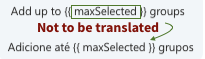
In this example Add up to (x) groups is correctly translated as "Adicione até (x) grupos." The {{maxSelected}} is a code inside KLMS that shall not be translated. It's within double brackets. It is correctly left out of the translation in this example.
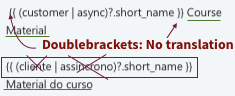
1b. Another example of incorrect translation where parts of code are translated and parts left for English. Course Material is translated to Material do curso but within the double brackets, parts of the English are translated in an attempt to do good without the knowledge of understanding that it makes harm for KLMS system.
2. VAR PLURAL
VAR PLURAL is a determination if you have a single unit or "many" units. For this reason, many translators translate the code and not the correct parts to be translated. See the image here below to understand that only the green part is to be translated. Not the word "other". Yes; it is hard for a translator to know and that's why we put this instruction here

In this example, the Portuguese translator made it wrong in exchange for the word "other" that belonged to the code making an error in the KLMS system. Just leave the word "other" here. In this example, the green part of English is translated into Portuguese correctly.
2b. Here is an example of how it shall be translated in VAR PLURAL and INTERPOLATION

3. Leave space out
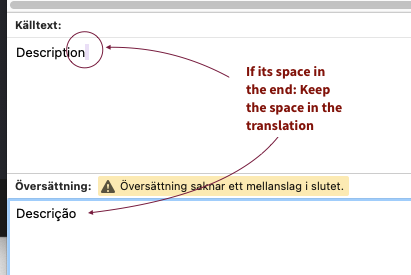
The space after or before the translated text shall not be there. If the English for some reason has a space after the phrase: it's an error from our side, but keep the space anyway. This is a very minor thing so you can leave this without any issue, but we mention this for quality reasons.
Please see the overview of the existing language for menus and content in KLMS.