Kunskapsbanken
How to import users from the internal HR system using the Import tool in Klickdata KLMS

How to import users from the internal HR system using the Import tool in Klickdata KLMS

Almost all companies and organizations have an HR system with their employees' information accessible as a CSV file to export. This file is easy to import in the KLMS when a company gets on board and starts to use the system for its online training, company surveys, and employee branding. 1. As an admin in the KLMS you have access to the Admin tool (see Top Bar). 2. Select Users 3. Click on Import on the Left Side. 4. Upload the file from your local computer. 5. You can save the templates used for the import so the regular import with people who are new onboard and with people who left the company are removed under Import templates 6. You can view the history of the employees´ imports and click on each line to view the result. 7. After each import, you can review the results of the updated file with error warnings and calls to action to update missing fields in order to keep the KLMS user data up to date at all times. 8. If your organization exceeds +50 users KlickData can also provide automated imports with mirroring or SSO of user data from your ERP-, Intranet- or HR system including synchronization of statistics and user validity for ease of administration. Contact us for this p
Svar

Almost all companies and organizations have an HR system with their employees' information accessible as a CSV file to export. This file is easy to import in the KLMS when a company gets on board and starts to use the system for its online training, company surveys, and employee branding.

1. As an admin in the KLMS you have access to the Admin tool (see Top Bar). 
2. Select Users
3. Click on Import on the Left Side.

KD FAQ importusers 200311

4. Upload the file from your local computer. 

KD FAQ importtemplates 200311
5. You can save the templates used for the import so the regular import with people who are new onboard and with people who left the company are removed under Import templates 

KD FAQ importhistory 200311

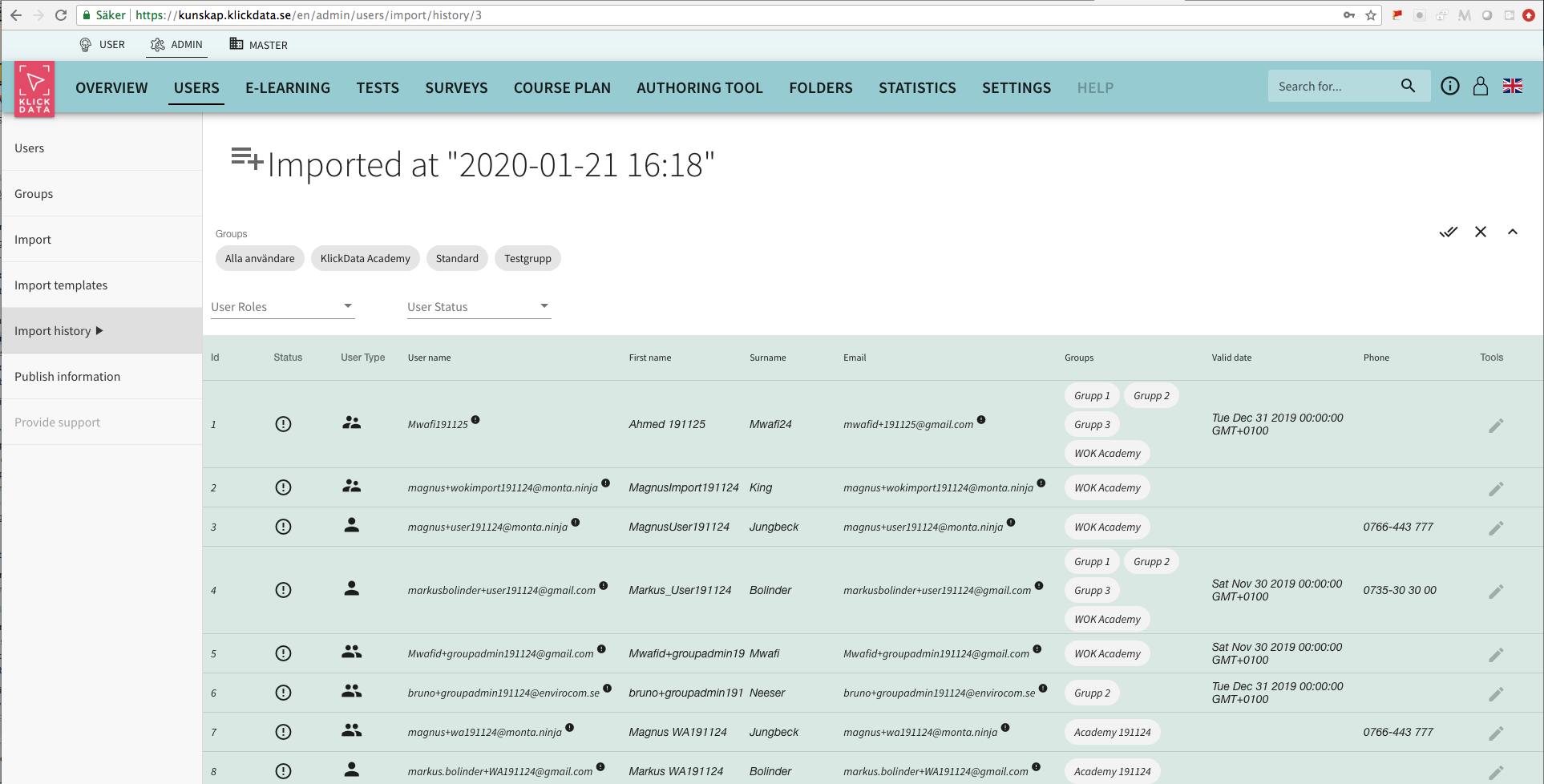
6. You can view the history of the employees´ imports and click on each line to view the result. 

KD FAQ importhistory example 200311

7. After each import, you can review the results of the updated file with error warnings and calls to action to update missing fields in order to keep the KLMS user data up to date at all times.

8. If your organization exceeds +50 users KlickData can also provide automated imports with mirroring or SSO of user data from your ERP-, Intranet- or HR system including synchronization of statistics and user validity for ease of administration. Contact us for this powerful integration that is included with a Site license to KlickData. 

Appendix

Publiceringsuppgifter
Publicerat
2020-03-11
Senast ändrat
2022-01-29
Kategori
FAQ KLMS, English FAQ
Mer om artikeln

This FAQ on KlickData KLMS was produced on September 3, 2020, and last edited on January 29, 2022. 
Since publishing, some information and screenshots might have been updated, modified, improved, or changed since we are updating our online platform for learning several times a week.