How to set roles in KlickData KLMS for management and teachers

This is how the admin set the Klick Data Learning Management System roles.
Go to Admin/ Settings / Academy Settings . Here you have wide selections of chevrons where settings are to be made for the Academy. It is based on the same principle as the individual Settings.

Chose Role Administrations

In this area, you chose from the default settings of roles. You can see what functions in KLMS are accessed to which roles and can adjust the roles in naming and in authority. Each organization can hence set up its own set of roles. To keep it simple to a minimum or to a wider area of roles. You will also have the ability to read-only or to Edit (write).


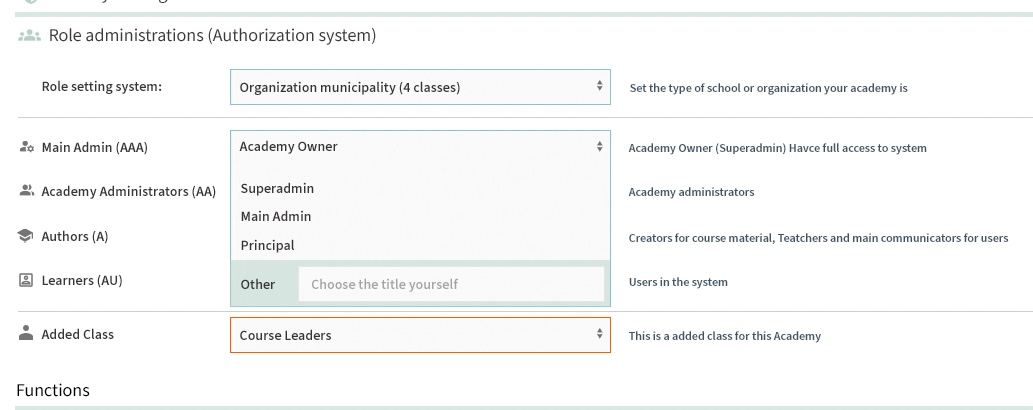
If you are not pleased with the role names: You can set them yourself. So it fits your organization.
Template of roles in KlickData KLMS
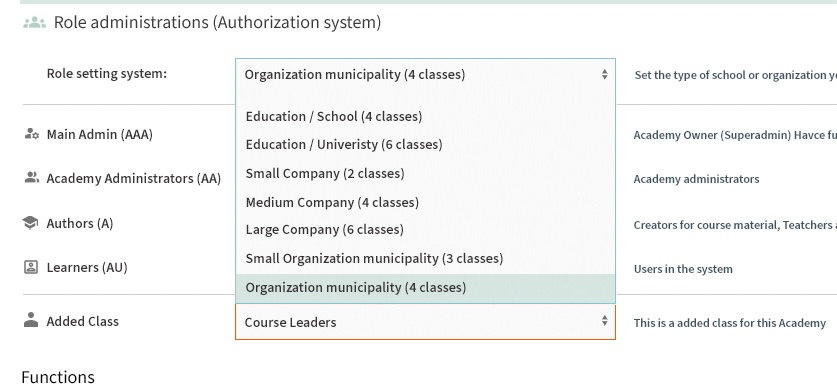
In the DNA of Klick Data, we have the ultimate goal of making it simple. Everything we do aims for simplicity. It's the same thing with Admin roles.
We have made the roles as simple as we can. Admin and User Level are the 2 main roles in KLMS. And a Master level for our internal use.
But larger cooperations need more sophistication. OK: So we have of course addressed this issue.
1. We have a template set for each role in an organization.
2. Admin (or rather the Main Admin of an Academy) can alter these roles and fine-tune each function.
So if you like to have a more sophisticated structure: We have made it possible in every detail to make each function in KLMS accessible for roles that can be defined. You can also define the Nomenclatura. We call by default the users for Learners. If your academy like to address them as consultants Students or Users: You can change this in the Academy Settings so it fits your organization.

The orange parts are roles within the KlickData organization. It's for the internal use and assurance we comply with safety regulations, and GDPR and has a solid structure in compliance with our policies.
The bluish-green color scheme is for the Super Admins who either are the head person of one Academy or handle more than one Academy within a group of companies, municipalities, or organizations. A Cluster is the definition of more than one Academy in the ecosystem of the Knowledge Network of KLMS. (See FAQ of Publish to Cluster).
The green colors are the roles of Academy Admins. We have Group Admin and Author roles here. Within these roles, you can then define an unlimited amount of roles. What shall an IT admin see and do in KLMS? What shall a teacher be able to do? Who will moderate the content providers (Authors) input in order to establish a minimum level of quality of the produced courses, tests, and surveys? (See Settings).
The last group is the Learners and the end-Users. They are defined by the identity of the Admins or being anonymous.