Publish your content as Draft, Academy or Public

Sharing is making anything stronger. You share knowledge and in KLMS you share content. If you create content there is three (3) different states.
- Draft mode
- Publish (to Academy)
- Public (to the Klick Data Library)
Draft mode is when you save and it's not "ready yet"
Publish is the default value to the Academy you belong to. But not for all Academies in the ecosystem of Klick data. Compared to Publish a Facebook Status to your friends but not to all users in Facebook.
We have made it easy to publish in the listing. If you hoover on the line: You will see different symbols.
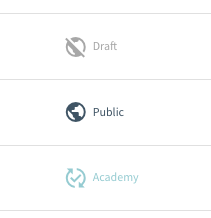
In the listing: When hoovering on content that is in the draft mood it looks like this: The red symbol with a crossed checkmark makes the clear signal that it is not either published in the Academy or Public in the Klick Data Library (KOL)

If you click to publish you confirm the publication :

And after publishing, it looks like this when you hoover. You now have a black symbol that shows the status and you can use this to unpublish it.

You also can publish to the public with the red global symbol crossed.
Clic to make it public and get a popup to ensure you are on the right track.
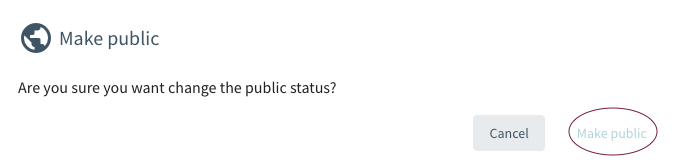
And after publication, you can unpublish or unpublic the public content with the same button.

The usefulness of having a template from others build on the notion of sharing.
Of course, content that is not to be outside the organization is not to be public. Admin can stop the public publication possibilities to make sure content created within the walls and intranet is not leaving the company.
Accessibility, availability, and visibility
Publish to a Specific learner (user) in KLMS and to specific academies is possible.
Note If the content is user-specific and not searchable or accessible for all registered learners and administrators in an Academy: The author can publish to selected learners or selected groups. This means that if the content is published to Tom and Mary only, the content can not be searched or accessed by Steve and Linda even if Steve and Linda are registered in the same Academy.
The same applies to Publish to KOL and to the public to all users registered in the ecosystem of KlickData. Instead of publishing to all academies, you might want to publish courses or Tests or Surveys to a cluster of Academies within your company structure, school Board district, or within governmental bodies (Like, for example, different Rescue services Departments in different municipalities of Sweden).
To summarize:

You can Publish a resource as a draft to yourself ("you only"). Or to one other specific person in the academy. Or to a group within the Academy. You can also choose to publish to all academies (public) or a cluster of Academies specified.
See also our FAQ about the Klick Data Open Library