The Grade System in KlickData KLMS
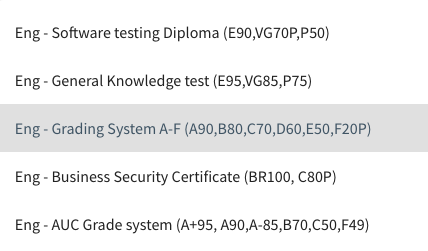
Each language has its own Grade System in KLMS.
In the naming of the Grade System that KLMS provides, we have (in parenthesis) defined the limits of percent required to get a Grade.
Example: Eng. Grade System A-F is the default Grade System that is suggested when creating a test.
A90 means if an Academy User (AU) takes the test and have 90% or more correct answers, the Test is passed with a grade of A. B80 means that the test results for the AUs that gets between 80& and 89% will be B.
For Academy Administrators (AA), the naming of the Grade System is created under the Admin Section and Menu Settings/ Grade Systems.
If an Administrator has not named the Grade System, the AU might not know what is demanded to receive a specific Grade, which might be on purpose ahead of the Exam.
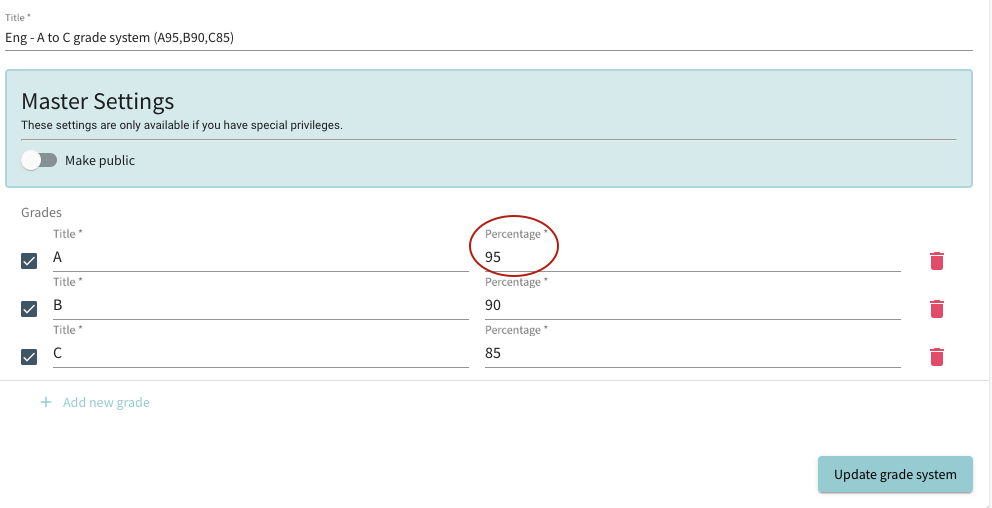
In creating a Grade System, the AA also sets a limit of Fail which will then be noted as Participation but will not get AU a Grade or Diploma.
The diploma limit is used when no grading is used and only one limit of "Pass". This limit can be set between 0 and 100%. So even if AU has zero answers correct, it will render a Diploma as long as he takes the test.