How do I switch language in the menus in KlickData KLMS?

This FAQ is explaining how you switch the language in KLMS. (sv. byta språk) .
And choose the content to display from the language perspective.
Before you login you can see a flag in the upper right corner:

In this example: The flag displays the Brazilian Flag and hence; the system is set in Portugeise. (pt: Portugues do Brasil) : Just click and choose the language before you log in to your liking.
Once you log in, the last time you log in there was a setting. If it's the first time: We choose your browser language for your convenience. If this language is not translated: we offer you English as the default language.
1. Go to the upper right corner and see your profile pic or a default image of a fictive person.

If it's the wrong language set: you choose the first choice of the Settings symbol. (Example when Swedish is chosen)

Example of how it looks when English is the language set in the upper corner of KLMS. Choose Settings.
2. Chose the second section to open "Personal Settings & Language"
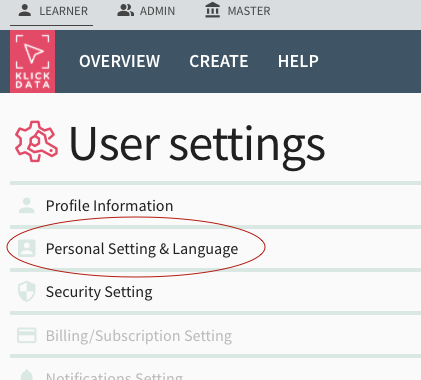
Clic anywhere on the row to open this section.

Clic on the Display Language row to see the options of the menus, popup, system messages, and tooltips. By February 2022 we have 10 languages to choose from, with Portuguese being the new member of the KLMS translated file. (If you like to translate to your language; instructions on how to do this in another FAQ).

If you switch the language you will see the effect direct and you can go back and use KLMS with all the menus changed.
The menu language is simple to set and can for obvious reasons only be one.

Go to the row (grey area) below the headline Preferred languages in content. In this example: this user/learner (AU) will get content in English and Swedish. He will not have any Arabic displayed or any other languages.
The content language is more complex. Out from the vast library of content in KLMS, you can exclude languages you will never use and only have the ones you like.
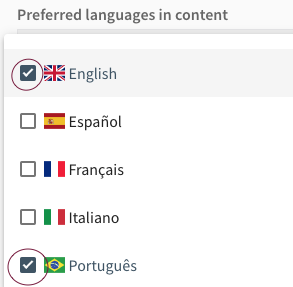
In the dropdown, you mark the languages you like to view the content inside KLMS. You can remove the language with the X on the language displayed after you have chosen if it's too many.
Note: Your administrator can have set other rules to the settings.
Other related FAQ to this article:
What languages are currently available in KlickData?