How to add a Quiz to a YouTube video
Let's say you find an excellent video on YouTube and you want someone who sees it to be able to take a quiz after seeing it. This is possible using the KLMS.
Step by Step guide.
1. Login to Klick Data KLMS (15-sec issue)
2. Go to User / Manage/ Create Course (10-sec issue)
3. Find a great video you like to add (3-min googling issue): From YouTube or in this case: a great TED Talk:
In this example we found this link about Opioids:
4. Go to Add Material and paste the link and add a Headline (15-sec work)
Mike Davis Ted Talk on Opioids in May 2020

5. Go to Add Test and Create a New Test (Quiz) (10-sec work)
6. Create Questions. (1 minute - 1 hr work depending on the level of effort)
6a. Using efforts made by others: Using the great Wikipedia database of Questions from WikiMaster/WOK to check if facts can be related to the YouTube or TEDtalk link (A 60-90 second work depending on fantasy)


6b. Adding your own Questions by writing them (3-5 min/ Question is an estimate depending on experience)
Listening to the TED Talk video for 8 min. 32 seconds, you realize you learn a lot about the addiction of opioids and the difference between opiates and opioids, the explanation of noradrenaline, and the treatment and risks involved with Naxalone, methadone, and other drugs. To create a great Quiz or Test to this video, you will need at least a 30 minute to learn the subject by seeing the video and take notes and review it with pause and play. In the meantime: You can have a tab open in the KLMS to create questions that are not generally related to opioids but specifically related to this, particularly video/lesson/course material.
After 20-60 minutes of work, depending on experience, you might have produced great questions like these:

You can do this either by
1. Open up the WikiMaster app and create generally fact questions that are related to the subject and be used by anyone in the World for the greater good just as you would spend time editing a Wikipedia article. Your effort will then be used by a global audience for free. The Guidelines on the Questions are set by the WOK Foundation who created these Quizzes on top of Wikipedia. Your questions can after this be imported to the KLMS system as described above in this article. Klick Data support this effort and endorse the WOK project.
2. You can create the questions directly inside the KLMS module for Create Course and have more freedom in the sense of not following the general rules of an MCQ being set by the WOK guidelines, such as multiple answers can be correct, different points depending on which alternatives used or having images only as alternatives. Questions on "What was the opinion on the subject covered in the film? " is relevant to the quiz regarding the presentation but would not fit the WOK project objectives of indisputable facts. If you create quizzes, you will know and understand the difference.
You will also be able to create tests that are limited to an audience you decide and not suitable for the public. Within a Company Academy, an Educational institution or a Governmental Body. See Site License.
In the example we use in this FAQ: a general MCQ question that would fit the WOK guidelines would be
Q: In what Century was the substance morphine extracted from the opium plant?
A: (Correct answer): 19th Century
B. Incorrect/Disposable1: 18th Century
C. Incorrect/Disposable2: 20th Century
D. Incorrect/Disposable1: 17th Century
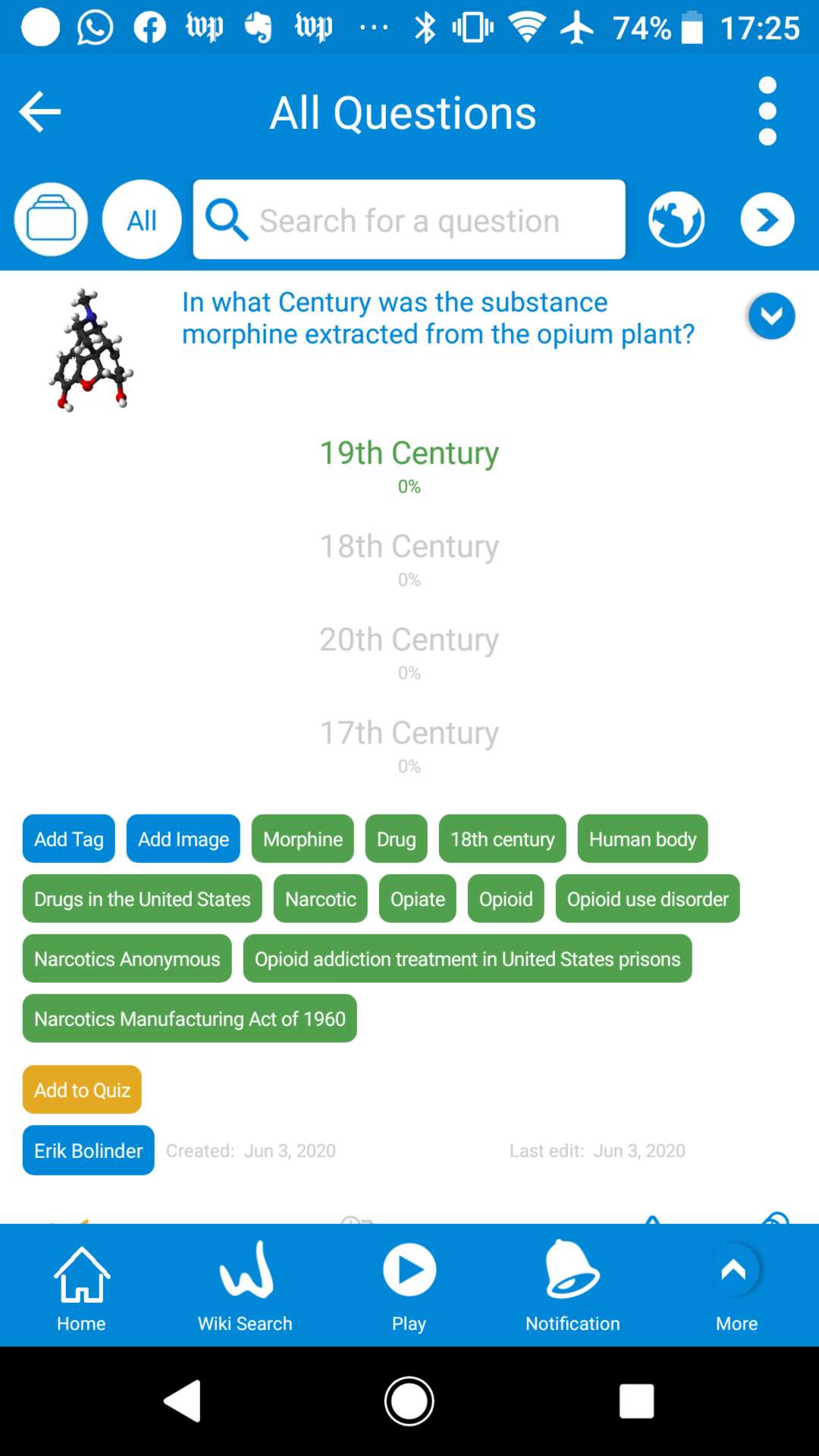
The Question is related to the TEDTalk video. It is also a general question that will be true for all time in the WOK database of multiple Choice Questions. In WOK, the relevance of the Question is made by indexing to the context of the question as to the example above shows with the question being related to many different Wikipedia articles. In the KLMS system with the example of being a part of the Course of Quiz related to the Mike Davis article it still has relevance when import.
If you like to view Questions on a browser before import: Go to http://wok.uno . Unfortunately, you cant create questions in the web version of WikiMaster. You need the mobile app WikiMaster or QuizKing on Android or iOS.
In this example, we can't rely solely on General Multiple- Choice Questions (GMCQ) made by others imported from the WOK database. We need to sit down and play the video and create the questions related to this specific material. We need to create MMCQ = Material Multiple-Choice Questions. MMCQ are the MCQs that are related to specific material content, such as the TedTalk video in this example. (See Definition of MCQ).
This FAQ on KlickData KLMS was produced on June 2, 2020
It was last edited on Nov 9, 2020.
Some information, screenshots might have been updated, modified, or changed since publishing since we are updating our online platform for learning several times a week.