List of Functions in KlickData KLMS

The list of functionality in a learning management system can be evaluated and compared. This is the list of functions in the KlickData KLMS. We define the functions into the roles of different users that we have created different functionalities for.
The Klick Data Academy, where individuals and small business owners have space and can sign up within a minute with the Settings adjusted for these groups, or "The Customer Academy", where the HR department or the Schools teachers and principals set the rules and standards after they sign a Site license contract.
1. Academy User :
From the perspective of Klick Data, a User or Academy User (AU) is a Learner with an account that gets him or her access to KLMS. It could be an Employee of a Company or a Student studying at a University or college. It could be an applicant for a job at a company, a distributor, a community citizen at a library, a customer, or a worker at a distributor. Depending on the Academy.
2. Academy Tutor
A Tutor or Academy Tutor (AT) is using KLMS to expand his or her business by selling his knowledge to others by creating Online Courses or Curriculums. A Tutor can put Material, Tests, and Surveys into a Course and Create Course Plans to send to others. An Academy Tutor can Save content produced as Private, Publish to Academy or Publish Globally to the Open Library. This role is the role of the Producer of Content. Technically this role is also called a Group Admin.
3. Academy Account Administrator
The HR department has appointed a CLMO, Chief Learning Management Officer within a company. He or she is responsible for the individual learning plans and assigns the courses to users, groups, or the company. The CLMO is in charge of the Online Education platform, such as KLMS, and makes sure the set budget for education is best used for the ROI. From the company perspective and from the employee perspective.
The top menu choice is called Admin in KLMS. Academy Account Admin (AAA) or shorter Academy Admin (AA) can import users and export and delete accounts within the company and are the main contact with Klick Data or the Distributor of Klick Data. For a Corporate Academy (CA) or an Educational Academy (EA), this is the same functionality. The HR Manager at a University or a College is the Principal, Teacher, or Dean.
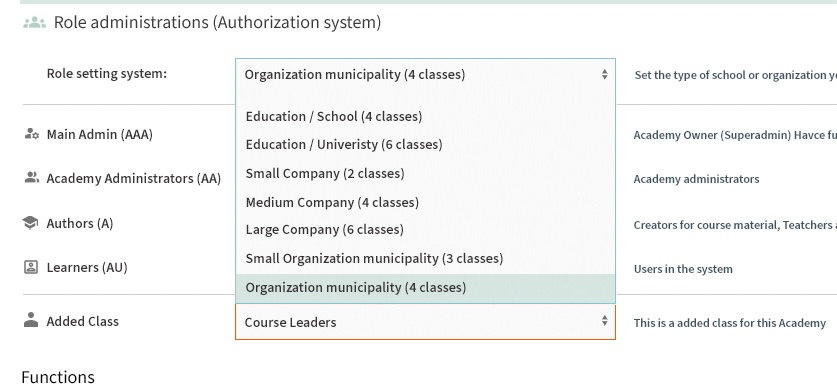
The AAA (Super Admin within the admins) can set a variety of Roles to the KLMS for each user and admin and specify which functions are to be available. So a larger organization can have a more sophisticated set of levels of authority for using KLMS.
4. Master Admin (MA):
This account is held by Klick Data or Distributor and the highest account. The functionality of Master Admin is to set up Academies and supervise functionality and support AAAs in their efforts to get the highest ROI on their investment. The feedback loop from AAA, Tutors, and Users is gathered with Data Analysis in order to improve the system for the benefit of all Customers.
Administrators Academy administrator = admin Group admin: Academy manager or Academy Teacher
The hiring process with KLMS as a tool.
When a company hires; KLMS is used to check the applicant's skills, values, and experience with the help of KLMS. It is a powerful tool for certification before entering the organization.
Its also a tool to educate partners, distributors, and even customers. No matter if you take a course by assignment from your boss, teach a subject with a webinar or administrate your staff knowledge, or sell the KLMS B2B, the KLMS offers functionality that is listed here.
Functionality that is working, in progress, or will be implemented as part of the plan.
Table of content.
1. User functions in KLMS main Klick Data Account
The functionality when you open an account in Klick Data, under the Klick Data Academy and use KLMS as a User or a Tutor.
1b. User functions in KLMS at an Academy Account
Being a staff member or employee in a company or work as a distributor or reseller of a company, you have the role of a User in the KLMS. Even a person that is about to get hired can use KLMS as a user on a Company Academy Account (CAA).
The same thing applies to Educational Academy Accounts (EAA) in schools, colleges, and Universities. Students are the users.
2. Academy administrator functions in KLMS
As an HR Manager or a CLMO, you have the tool to overview the progress of the Organization Knowledge Progress on a Company, Group, or individual level.
3. Master functions in KLMS
The role of a Distributor of the KLMS has the functionality to administrate different clients and many Academies.
4. Explanations
Explanation of the terminology and stars in this overview